In our increasingly connected world, electronic devices are indispensable, and keeping them powered is a daily necessity. Yet, the myriad of chargers and devices can lead to confusion, sometimes with costly consequences. Using an incompatible charger might seem harmless, but it can lead to inefficient charging, damage to your device, or even safety hazards like overheating or fire. Understanding the fundamental principles of charger compatibility, particularly voltage, is crucial for protecting your valuable electronics and ensuring a seamless charging experience. This guide will walk you through the essential steps to verify charger voltage compatibility, demystifying the electrical jargon and empowering you to make informed decisions.
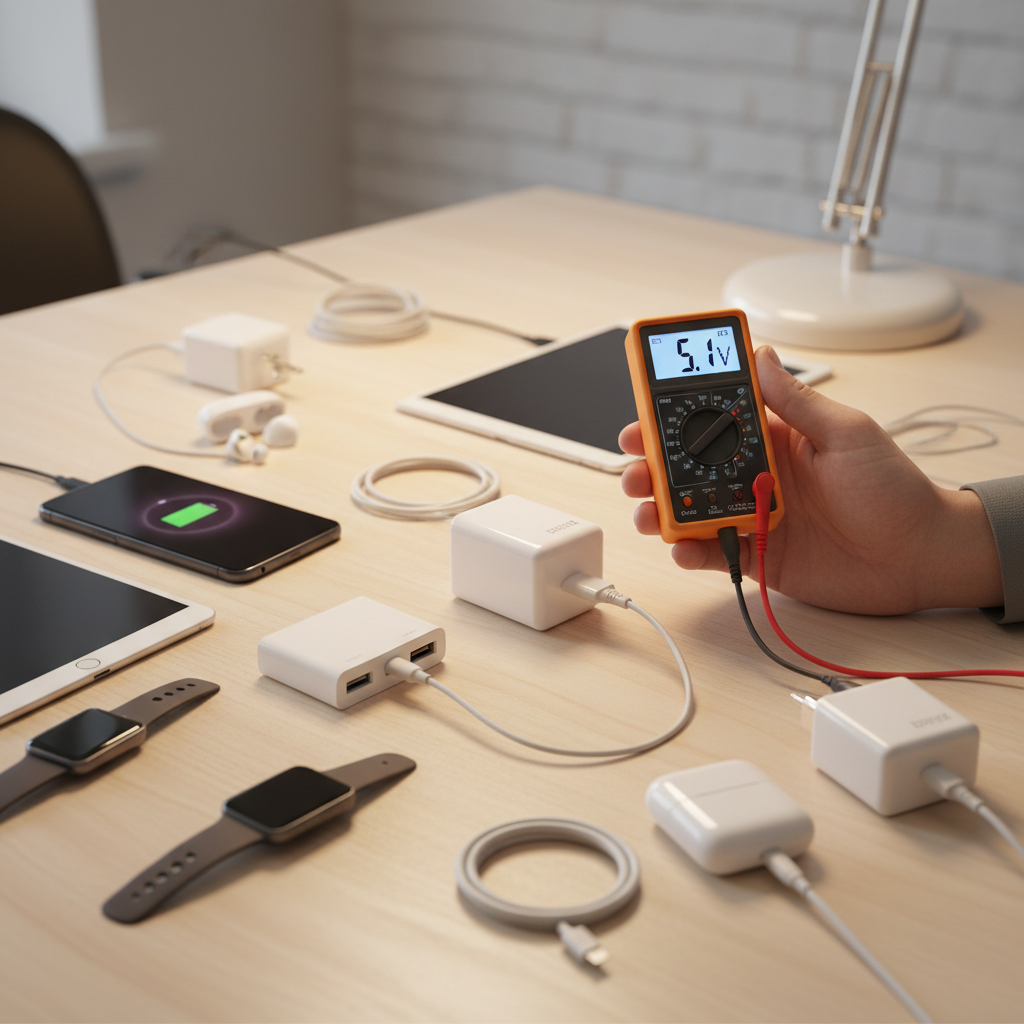
Understanding the Electrical Trio: Volts, Amps, and Watts
To truly grasp charger compatibility, it’s vital to understand the core electrical terms that define power flow: volts, amps, and watts. Imagine electricity as water flowing through a hose.
- Voltage (V): The Electrical Pressure: Voltage represents the “pressure” at which electricity flows. Measured in volts, it indicates the potential difference that drives the current. Think of it as the force pushing the water through the hose. If the voltage is too high for your device, it’s like using a fire hose to water a delicate plant—it will overwhelm and damage the system. Conversely, too low voltage might mean the water pressure isn’t strong enough to reach the device effectively.
- Amperage (A): The Electrical Current: Amperage, or current, refers to the “amount” or “flow rate” of electricity. Measured in amperes (amps), it’s the volume of water flowing through the hose per second. A device draws the current it needs, so a charger with a higher amperage rating than your device requires is generally safe; the device will simply draw its maximum specified current. However, a charger with insufficient amperage may result in slow charging or a device that doesn’t charge at all.
- Wattage (W): The Total Power: Wattage is the total amount of electrical power being delivered, measured in watts. It’s the product of voltage and amperage (Watts = Volts × Amps). In our water analogy, wattage is the total force hitting the bucket at the end of the hose. A higher wattage rating typically means faster charging, assuming your device can utilize that higher power. The device will only draw the wattage it needs, up to its maximum supported capacity.
|
Our Picks for the Best Handheld vacuum cleaner in 2026
As an Amazon Associate I earn from qualifying purchases.
|
||
| Num | Product | Action |
|---|---|---|
| 1 | Handheld Vacuum Cordless, Car Vacuums Powerful with Rechargeable Battery, Portable Hand Held Vacuum Cordless with Washable HEPA Filter, Mini Vacuums Kit for Men and Women |

|
| 2 | Bissell Pet Hair Eraser Cordless Hand Vacuum, Lithium Ion, Home, Auto, and Pet Vacuum, Easy-Empty Dirt Bin, Upholstery Tool, Brush Tool, and Crevice Tool Included, 2390A |
|
| 3 | Gxzsk Handheld Vacuum Cordless, 15000PA Strong Suction Hand Held Car Vacuum Cleaner Rechargeable, Portable Hand Vacuum with Multi-Nozzles & Washable Filter for Home Office, Car, Pets |
|
| 4 | KMM Handheld Car Vacuum Cleaner, 9000Pa Vacuum Cleaner and Air Duster, 120W High Power Hand Held Vacuum with LED Light and Multi-Nozzles for Car, Home, Office, Pet |
|
| 5 | MONOZEL Car Vacuum Portable Cordless, 18000Pa 2 in 1 Vacuum Cleaner&Air Duster, 130W Brushless Motor Handheld Vacuum Cordless with 7800mAh Battery, LED Light, Multi-Nozzles for Car, Home, Office, Pet |
|
| 6 | BLACK+DECKER dustbuster AdvancedClean Handheld Vacuum Cordless, Compact Home and Car Vacuum with Crevice Tool, Rotating Nozzle and Charging Station, Large Dust Bowl (CHV1410L) |
|
| 7 | BLACK+DECKER dustbuster Cordless Handheld Vacuum, Portable Car Vacuum Cordless Rechargeable, Wall Mount, Strong Suction QuickClean (HNVC215B10) |
|
| 8 | Handheld Vacuum Cleaner, 28000Pa Brushless Motor Cordless Car Vacuum Cleaner, 3-Speed Mini Hoovers with Multiple Brush Heads Hand Held Vacuum Cordless for Office, Home, Kitchen, Car, Pet Hair |
|
| 9 | BLACK+DECKER dustbuster Cordless Handheld Vacuum, Portable Vacuum for Car and Home Rechargeable, Powerful Suction, Wide Mouth (HHVI315JO42) |
|
| 10 | CKIKH Handheld Vacuum Cordless, 15000PA Strong Suction Hand Held Car Vacuum Cleaner Portable with Multi-Nozzles & Washable Filter, Lightweight Rechargeable Vacuum Cleaner for Home, Car, Office, Pets |
|
Why Charger Compatibility Matters (and the Risks of Mismatched Chargers)
The seemingly innocent act of grabbing “any” charger that fits can have serious repercussions. Charger compatibility isn’t just about convenience; it’s about safeguarding your devices and ensuring your safety.
- Device Damage: The most significant risk of using an incompatible charger, especially one with a higher voltage, is permanent damage to your device’s internal components. Overvoltage can “fry” circuits, corrupt sensitive NAND flash, or damage logic boards. For example, plugging a device designed for 5V into a 12V charger without proper regulation can instantly destroy it.
- Slow or No Charging: If a charger provides a lower voltage or insufficient amperage than your device requires, you might experience extremely slow charging, or the device may not charge at all. In some cases, the device might even continue to drain its battery faster than it can charge. This is a common frustration, often leading to reduced productivity and an uncharged device when you need it most.
- Overheating and Fire Hazards: Mismatched electrical specifications can lead to excessive heat generation in both the charger and the device. Overheating can degrade battery life, melt internal components, or, in severe cases, cause a fire. Inferior or unlicensed chargers are particularly prone to these dangers due to inadequate protection circuitry.
- Battery Degradation: Even if immediate catastrophic failure doesn’t occur, consistent use of an incompatible charger can stress your device’s battery, leading to reduced lifespan and capacity over time. The battery might not charge efficiently or could undergo accelerated wear and tear.
“Ignoring charger compatibility can turn a simple charging task into a costly repair or, worse, a safety hazard. Always check the specs to protect your electronics.” – Admin of ReviewerBil.com, Handheld Vacuum Cleaner Expert
Step-by-Step Guide: How to Check Charger Voltage Compatibility
Checking charger compatibility is a straightforward process once you know where to look. Follow these steps to ensure a perfect match:
-
Locate the Labels (Input & Output Specifications):
- On Your Device: Look for the input specifications, usually printed on the device itself, near the charging port, or in the user manual. You’ll typically find “Input” followed by voltage (V) and amperage (A) ratings. For example, “Input: 5V 2A” or “Input: 12V 1.5A.” For laptops, this information might be on the bottom or near the power input.
- On Your Charger/Power Adapter: Find the output specifications. These are usually printed on the charging brick or power adapter. Look for “Output” followed by voltage (V) and amperage (A) ratings, such as “Output: 5V 2.4A.” Chargers designed for various devices may list multiple output profiles (e.g., “Output: 5V/3A, 9V/2A, 12V/1.5A”).
-
Match the Voltage (V) – The Golden Rule:
- Exact Match is Ideal: The output voltage of your charger must match the input voltage requirement of your device. For instance, if your device requires 5V, use a 5V charger.
- Voltage Ranges for Travel: For international travel, many modern chargers are “dual voltage” or “worldwide voltage” compatible, indicated by an input voltage range like “Input: 100-240V, 50/60Hz.” This means the charger can safely operate with various global power standards, requiring only a physical plug adapter, not a voltage converter. If your device or charger only lists a single voltage (e.g., “120V”), you’ll need a voltage converter when traveling to regions with different power standards (e.g., 220-240V).
-
Consider the Amperage (A): Equal or Higher is Safe:
- Charger Amperage ≥ Device Amperage: The charger’s output amperage should be equal to or higher than your device’s input amperage requirement. Your device will only draw the current it needs. For example, if your device needs 1A, a 2A charger is safe and might even charge slightly faster (depending on the device’s internal charging circuitry) than a 1A charger.
- Too Low Amperage: If the charger’s amperage is lower than the device’s requirement, the device will charge very slowly, if at all, and the charger might overheat due to being overworked.
-
Calculate/Verify Wattage (W): For Optimal Speed:
- While not always explicitly listed, wattage (Volts x Amps) gives you an idea of the total power. For faster charging, aim for a charger with a wattage equal to or greater than your device’s maximum charging wattage. Again, the device will only draw what it needs.
-
Check Polarity (for Non-USB Chargers):
- For devices that use barrel connectors (common on older electronics, small appliances, or specific gadgets), polarity is critical. The label on both the device and the charger will usually have a small diagram showing whether the center pin is positive (+) or negative (-). These must match perfectly. Mismatched polarity can cause immediate and severe damage.
-
Connector Type:
- Beyond electrical specs, the physical connector must match. This includes USB-A, USB-C, Micro-USB, Lightning, barrel connectors, and proprietary ports. A physically incompatible connector prevents connection, but be wary of adapters that allow electrical incompatibility.
The Role of Smart Charging: USB-C and Power Delivery (PD)
Modern charging technologies, particularly USB-C with Power Delivery (PD), have significantly simplified compatibility.
- Intelligent Negotiation: USB Power Delivery is a protocol that allows devices and chargers to “negotiate” the optimal voltage and current levels. Instead of a fixed output, a PD-enabled charger can dynamically adjust its output (e.g., 5V, 9V, 12V, 15V, 20V) to match the device’s needs. This means a single USB-C PD charger can efficiently and safely charge a wide range of devices, from smartphones to laptops.
- Enhanced Safety: The negotiation process built into USB-C PD inherently provides a layer of safety, preventing a device from receiving too much voltage. If the device doesn’t “talk” to the charger, the charger typically defaults to a safe 5V output.
- Laptop Chargers for Phones: Thanks to PD, you can generally use a USB-C laptop charger to safely charge your smartphone, provided both devices support USB PD. The phone will communicate with the charger and request only the power it needs (e.g., 9V/2A for fast charging), even if the laptop charger is capable of much higher wattages (e.g., 65W or 100W). However, always ensure you’re using reputable, certified chargers and cables.
Tips for Safe Charging and Buying New Chargers
Ensuring charger compatibility extends beyond just reading labels; it involves making smart choices when purchasing and using your charging equipment.
- Always Opt for Original or Reputable Third-Party Chargers: While it might be tempting to save a few dollars on a generic charger, the risks often outweigh the cost savings. Stick to the charger that came with your device or purchase replacements from trusted brands known for quality and safety certifications.
- Beware of Unbranded or Suspiciously Cheap Chargers: These often lack proper internal protection circuits, use substandard components, and may not adhere to safety standards, increasing the risk of damage, overheating, or fire.
- Check for Safety Certifications: Look for recognized safety certifications like UL, CE, FCC, or ETL on the charger. These marks indicate that the product has been tested and meets specific safety standards.
- When Traveling Internationally:
- Verify if your device and its charger are dual voltage (e.g., “100-240V”). If so, you only need a physical plug adapter to fit the local outlets.
- If your device is single voltage (e.g., “120V only”), you will need a voltage converter (also called a transformer or step-down converter) to safely use it in regions with different voltages. A simple plug adapter will not change the voltage and will likely damage your device.
- Always check the frequency (Hz) as well, though most modern electronics are compatible with both 50Hz and 60Hz.
Conclusion
Understanding charger voltage compatibility is more than just a technical detail; it’s a fundamental aspect of device care and personal safety. By diligently checking the voltage, amperage, and wattage ratings on both your device and charger, and paying attention to crucial elements like polarity and connector types, you can prevent costly damage, ensure efficient charging, and extend the lifespan of your electronics. Modern innovations like USB-C Power Delivery offer greater flexibility and safety, but the core principle remains: matching specifications is paramount. Take a moment to inspect your chargers today – a little vigilance goes a long way in protecting your investments. Do you regularly check the compatibility of your chargers, or has this guide revealed new insights for you?
Frequently Asked Questions
Can I use a charger with higher amps than my device needs?
Yes, generally it is safe to use a charger with a higher amperage rating than your device requires. Your device will only draw the amount of current (amps) it needs, so the excess capacity from the charger will simply go unused without causing harm.
What happens if I use a charger with lower voltage?
Using a charger with a lower voltage than your device requires can lead to several issues: the device may charge very slowly, not charge at all, or it might struggle to power on or function correctly. In some cases, the charger itself might overheat from being overtaxed.
Are all USB-C chargers interchangeable?
While many USB-C chargers support the Power Delivery (PD) protocol, making them broadly compatible and capable of safely negotiating appropriate power levels, they are not all fully interchangeable for optimal performance. Some devices, especially high-power laptops, might require a specific wattage to charge efficiently, and a lower-wattage USB-C charger might only charge them slowly or not at all while in use.
How do I check polarity on a charger?
For non-USB chargers (typically with a barrel connector), look for a small diagram on the charger and the device showing two concentric circles. A line will connect the center dot to either a plus (+) or minus (-) sign, indicating the polarity of the center pin. The outer circle will also have a sign. Both diagrams must match for safe use.